
HP sells the same ink in several different formats, and the naming isn't always obvious. Here's what each option actually is, in plain terms.
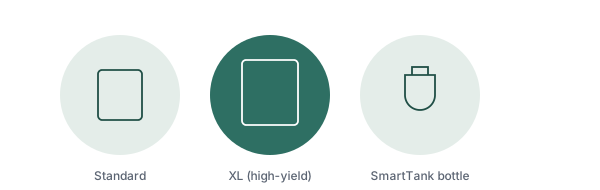
HP identifies its cartridges by number, not by letter — HP 63, HP 67, HP 902, HP 962, and so on, each tied to specific printer models. There isn't an "HP A" series. What almost everyone actually means by a letter-based question like this is the real, well-documented distinction below: standard cartridges versus their "XL" counterparts.
This is the one that matters most. For many HP cartridge numbers, you'll find two versions: the plain number (like HP 63) and the same number with "XL" added (HP 63XL). Both are physically the exact same size and install identically — the only difference is how much ink is inside.
Some printer lines go a step further with an "extra high yield" option (sometimes labeled XXL or with a different number entirely, like HP 962 standard, 962XL, and 966XL for the same printer family) — check your exact model's supported list before assuming a size is available.
HP Instant Ink is a monthly subscription: your printer tracks usage and HP automatically ships new cartridges before you run out, billed by pages printed rather than by cartridge. It's a convenience and cost-management choice layered on top of the standard/XL cartridges above, not a separate physical cartridge format. Whether it's worth it depends entirely on your print volume and whether you'd rather pay a predictable monthly fee than buy cartridges as needed.
SmartTank (and the older Ink Tank line) printers don't use cartridges at all — they have refillable tanks you top up directly from ink bottles, similar to filling a car with gas. The upfront printer cost is higher, but the cost per page is dramatically lower since bottles hold far more ink than any cartridge; one real example is an HP 32XL-equivalent black bottle rated for around 6,000 pages. This system also tends to resist drying out better than cartridges, since the tanks hold more volume. It's the better long-term option for high-volume printing, and the worse option if you print rarely, since the higher upfront printer cost takes longer to pay back.
Some HP printers use one black cartridge plus one combined "tricolor" cartridge holding cyan, magenta, and yellow together. Others use four or more fully separate cartridges, one per color. The tradeoff: with a combined tricolor cartridge, running out of just one color means replacing the entire cartridge, wasting whatever ink remains in the other two colors — separate cartridges avoid that waste but cost more to stock as spares.
The cartridge number is printed directly on the cartridge itself, and also in your printer's documentation. If you don't have either handy, search your printer model on HP's own support site rather than guessing — cartridge numbers are model-specific, and an incorrect guess won't fit or won't be recognized.
Our full guide covers installation mistakes, storage, and the original-vs-compatible ink question.
Read the replacement guidePG vs. CL, Standard vs. XL vs. XXL, and Canon's MegaTank system.
Read the article →When to actually replace a cartridge, and common installation mistakes.
Read the article →Real causes, and how a nozzle check tells you which one you have.
Read the article →